iOS 27: Release Date, Supported iPhones & New Features
iOS 27 is available in developer and public beta ahead of its full release in September 2026. It supports the iPhone 11, second-generation iPhone SE and every newer model, but its biggest feature, Siri AI, needs an iPhone 15 Pro or newer.
Siri has been rebuilt to understand your personal information, see what is displayed on your screen, search the web and take action inside supported apps.
Use written instructions to make supported edits rather than adjusting every setting manually.
Describe what you want a Shortcut to do using normal language.
Safari can sort open tabs into more manageable groups.
Safari can notify you when a selected part of a website changes.
Apple has made changes intended to make supported iPhones feel quicker.
Parents receive more control over limits, approvals and children’s device use.
Compatible AirPods receive more direct sound-adjustment controls.
The interface can be customised to change the appearance and strength of Apple’s Liquid Glass design.
| Detail | iOS 27 Information |
|---|---|
| Announced | June 8, 2026 at WWDC |
| Developer beta | Available now |
| Public beta | Available now |
| Current beta | Beta 5 at the time of writing |
| Full release | September 2026 expected |
| Price | Free |
| Oldest supported iPhone | iPhone 11 and iPhone SE 2 |
| Apple Intelligence requirement | iPhone 15 Pro or newer |
| Full Siri voice features | 12GB of RAM required |
| Main new feature | Siri AI |
| Design change | Customisable Liquid Glass |
| New iPhones | Ships with iPhone 18 Pro, Pro Max and Ultra |
| EU availability | Siri AI unavailable on iPhone at launch |
| China availability | New Siri AI and Apple Intelligence features unavailable initially |
An iPhone 11 can install iOS 27, but it will not receive Siri AI or every Apple Intelligence feature. Access also varies by language and region, with extra restrictions expected in the EU and China at launch.
The bottom line: iOS 27 supports plenty of older iPhones, but the headline Siri AI features are built for newer hardware. If you own an iPhone 14 or older, expect the design, Safari, Screen Time and performance changes rather than the full AI package.
iOS 27 is Apple’s biggest attempt yet to fix Siri, make Apple Intelligence genuinely useful and improve the basic speed of older iPhones.
That last part matters.
Apple spent much of the past few years adding visual changes and AI features that only worked on newer hardware. iOS 27 still has plenty of those, but Apple has also worked on app launch times, AirDrop speeds, search, keyboard responsiveness and the way iPhones switch between Wi-Fi and cellular networks.
Apple says apps can open up to 30% faster, newly captured photographs can load up to 70% faster and AirDrop transfers can complete up to 80% faster.
Those improvements apply to compatible older devices, including the iPhone 11.
The headline feature, however, is Siri AI. Apple has rebuilt Siri around generative AI, personal context, onscreen awareness and the ability to perform actions inside apps.
It should finally be able to answer follow-up questions, find information buried inside your email, understand what is displayed on your screen and complete multi-step jobs without sending you to a Google search.
That is the theory, anyway.
Here is everything currently known about iOS 27, including its release date, supported iPhones, Apple Intelligence requirements, redesigned Siri, app upgrades, performance claims and whether you should install the beta.
iOS 27 At A Glance
| Detail | iOS 27 |
|---|---|
| Announced | June 8, 2026 at WWDC |
| Developer beta | Available now |
| Public beta | Available now |
| Current beta | Beta 5 at the time of writing |
| Public release | September 2026 expected |
| Price | Free |
| Oldest supported iPhone | iPhone 11 and iPhone SE 2 |
| Main feature | Siri AI |
| Apple Intelligence requirement | iPhone 15 Pro or newer |
| Full Siri AI feature set | Currently limited to newer 12GB iPhones |
| EU availability | Siri AI unavailable on iPhone at launch |
| UK availability | Expected in English on supported devices |
| China availability | Siri AI and new Apple Intelligence features unavailable at launch |
What Is iOS 27?
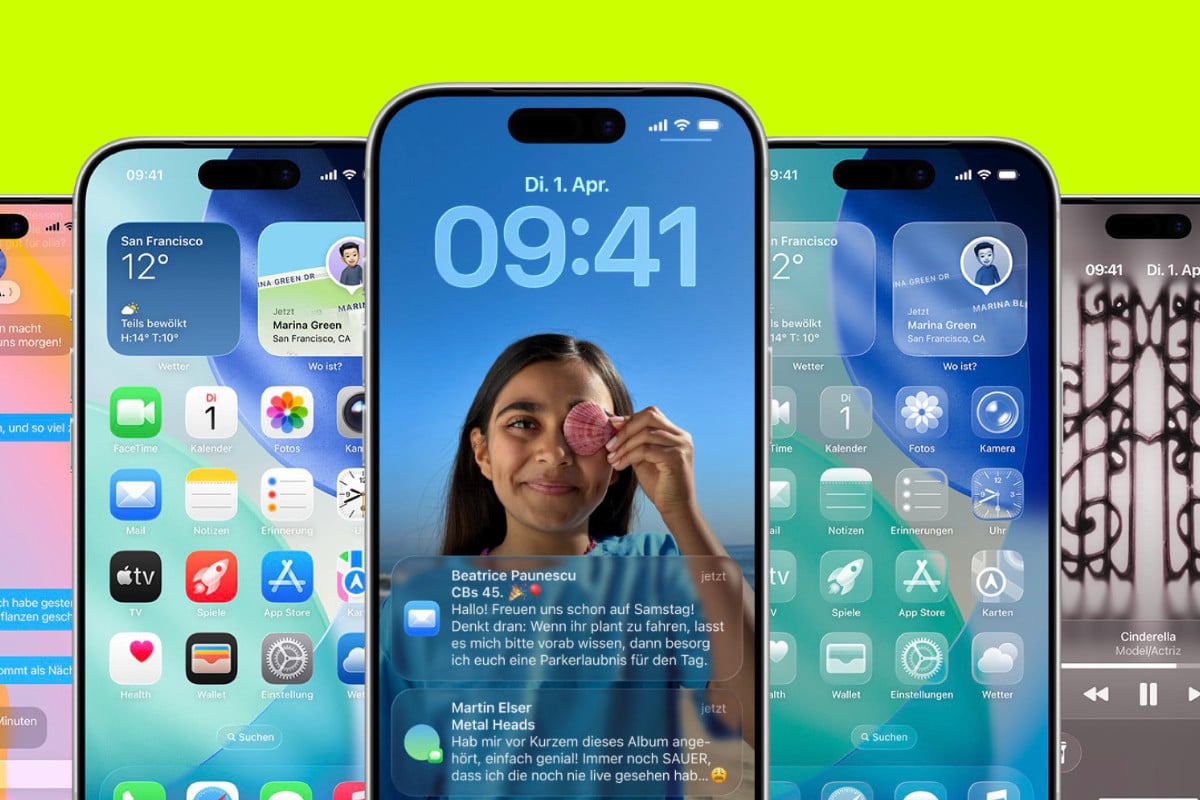
iOS 27 is the next major version of Apple’s iPhone operating system.
Apple announced it at the Worldwide Developers Conference on June 8, 2026. Developers received the first beta immediately, followed by the public beta in July.
The final update is expected in September, around the same time Apple launches the iPhone 18 Pro, iPhone 18 Pro Max and its first folding iPhone.
Unlike iOS 26, which introduced the Liquid Glass design across Apple’s software, iOS 27 is more focused on:
- Rebuilding Siri
- Adding Apple Intelligence to more apps
- Making older iPhones feel faster
- Improving system search
- Fixing Liquid Glass readability
- Expanding parental controls
- Preparing iOS for a folding iPhone
- Making everyday apps smarter
Apple has also begun using the year-based numbering system across its platforms, so iOS 27 is the 2027 software generation even though it launches during 2026.
When Will iOS 27 Be Released?
Apple says iOS 27 will be available as a free update in autumn 2026.
The company has not confirmed the exact date. Based on previous releases, the final version should arrive during the second or third week of September.
A possible timeline looks like this:
| Stage | Date |
|---|---|
| WWDC announcement | June 8, 2026 |
| First developer beta | June 8, 2026 |
| First public beta | July 13, 2026 |
| Current testing | August 2026 |
| Release candidate | Early to mid-September expected |
| Public launch | Mid-September 2026 expected |
Apple normally releases the final version shortly before its new iPhones reach customers.
The iPhone 18 Pro and Pro Max are expected in September 2026, while the standard iPhone 18 may not arrive until spring 2027.
Our iPhone 18 release date guide tracks the changing hardware schedule.
Which iPhones Support iOS 27?
Apple is not dropping any iPhones that currently support iOS 26.
That means iOS 27 works on the iPhone 11 and newer, plus the second and third-generation iPhone SE.
Full iOS 27 Compatibility List
- iPhone 17e
- iPhone 17
- iPhone Air
- iPhone 17 Pro
- iPhone 17 Pro Max
- iPhone 16e
- iPhone 16
- iPhone 16 Plus
- iPhone 16 Pro
- iPhone 16 Pro Max
- iPhone 15
- iPhone 15 Plus
- iPhone 15 Pro
- iPhone 15 Pro Max
- iPhone 14
- iPhone 14 Plus
- iPhone 14 Pro
- iPhone 14 Pro Max
- iPhone 13
- iPhone 13 mini
- iPhone 13 Pro
- iPhone 13 Pro Max
- iPhone 12
- iPhone 12 mini
- iPhone 12 Pro
- iPhone 12 Pro Max
- iPhone 11
- iPhone 11 Pro
- iPhone 11 Pro Max
- iPhone SE 2
- iPhone SE 3
The iPhone 18 Pro, iPhone 18 Pro Max and folding iPhone Ultra will ship with iOS 27 installed.
The standard iPhone 18, iPhone 18e and iPhone Air 2 should also use iOS 27 when they arrive in spring 2027. You can see how those devices fit into Apple’s new timetable in our spring 2027 iPhone lineup guide.
Not Every Supported iPhone Gets Every Feature
Being able to install iOS 27 does not mean your iPhone gets the complete feature list.
Apple has effectively divided iPhones into three levels.
Level One: Standard iOS 27 Features
The iPhone 11 and newer receive the core update, including:
- Faster app launches
- Updated Liquid Glass controls
- Search improvements
- Screen Time changes
- Messages reliability updates
- AirDrop improvements
- Network switching improvements
- App redesigns
- Compatible non-AI features
Level Two: Apple Intelligence And Siri AI
Most new AI features require:
- iPhone 15 Pro
- iPhone 15 Pro Max
- Any iPhone 16 model
- iPhone Air
- iPhone 17 series
- Newer devices
The standard iPhone 15 and iPhone 15 Plus are not supported because they use the A16 Bionic and have less memory.
Level Three: The Full Siri AI Feature Set
A small number of on-device Siri functions need at least 12GB of RAM.
At the moment, this includes hardware such as:
- iPhone 17 Pro
- iPhone 17 Pro Max
- iPhone Air
- Newer compatible models with at least 12GB of RAM
These phones can use the most advanced speech-to-text system and controls for adjusting Siri’s voice pace and expressiveness.
This memory requirement could also affect the standard iPhone 18. Reports disagree on whether it will ship with 9GB or 12GB of RAM.
If Apple chooses 9GB, it could launch a brand-new phone that cannot run every iOS 27 feature. Our A20 and A20 Pro guide explains how memory and processor differences may divide the iPhone 18 range.
Siri AI Is The Biggest iOS 27 Upgrade
Siri AI is Apple’s completely rebuilt version of Siri.
The old Siri was useful for setting timers, checking weather and handling basic commands. Ask it anything slightly complicated and it often gave up, misunderstood the request or sent you to a web page.
Siri AI is designed to behave more like a modern AI assistant.
It can:
- Hold a back-and-forth conversation
- Remember the context of earlier questions
- Search across your personal information
- Understand what is on the screen
- Look up current information on the web
- Perform actions inside apps
- Work with images and documents
- Draft and edit text
- Answer follow-up questions
- Help build multi-step Shortcuts
The new assistant appears throughout iOS, but Apple has also created a dedicated Siri app.
Siri Can Understand Personal Context
Siri AI can search across apps such as:
- Messages
- Notes
- Photos
- Reminders
- Calendar
- Files
You can ask natural questions rather than remembering exact filenames, dates or senders.
Examples include:
- “What was the door code Sarah sent me?”
- “Find the hotel booking for next weekend.”
- “Which restaurant did Mike recommend last month?”
- “Find the document my landlord emailed me.”
- “When does my flight leave?”
- “Show me the photos from our trip to Manchester.”
- “What time am I meeting Dan tomorrow?”
The assistant looks across supported personal data and tries to identify the correct result.
This is where Apple’s system has the potential to become genuinely useful. Most people have important information scattered across messages, screenshots, emails, notes and photographs.
Finding it manually can be a pain. Siri AI is supposed to do that searching for you.
Siri Can Understand What Is On Your Screen
Siri AI has onscreen awareness.
You can ask about an image, message, document, web page or chart without explaining what you are viewing.
For example:
- “Summarise this.”
- “Translate this menu.”
- “Where was this photo taken?”
- “Add this event to my calendar.”
- “What does this chart mean?”
- “Give me directions to this place.”
- “Save this number to my contacts.”
- “Does this document look right?”
- “Find something similar to this product.”
You can select a particular piece of text or an image and ask Siri specifically about that selection.
Follow-up questions remain connected to the original request. If you ask Siri to summarise an article, you could then ask it to explain one section in simpler terms without starting again.
Siri Can Take Actions Inside Apps
Siri AI is not limited to answering questions. It can perform actions.
Depending on app support, Siri can:
- Draft and send an email
- Delete messages from a particular sender
- Add an event to Calendar
- Create a reminder from an email
- Move photographs into an album
- Save information to Notes
- Find and open a file
- Share your location
- Prepare a route in Maps
- Edit text
- Start a playlist
- Change system settings
Third-party developers can use Apple’s App Intents framework to make their apps work with Siri actions.
The real test will be reliability.
An AI assistant confidently describing the wrong hotel booking is irritating. An assistant deleting the wrong emails or sending a message to the wrong person is much worse.
Apple needs to make confirmations clear when an action affects data, money or communication.
Siri Now Has Its Own App
iOS 27 includes a standalone Siri app.
It works more like ChatGPT, Gemini or Claude, with a conversational interface and saved history.
Inside the app, you can:
- Start a new conversation
- Continue an older conversation
- Review previous answers
- Find earlier searches
- Work with uploaded images
- Work with documents
- Change how long conversations are stored
Siri history can sync privately through iCloud across supported Apple devices.
You can choose to retain conversations for a month, a year or indefinitely.
Siri remains available through the side button and the “Siri” or “Hey Siri” voice command. Swiping down from the centre of the Home Screen also opens a combined Search or Ask interface.
Siri Can Search The Web
The old Siri relied on narrow data sources and frequently passed questions to a search engine.
Siri AI has broader world knowledge and can search for current information.
You can ask it about:
- Sports results
- Concerts
- Opening times
- Recipes
- Travel plans
- Homework
- Gardening
- DIY jobs
- News
- Local businesses
- Product comparisons
- Calculations
It can combine web information with documents and personal context.
For example, you could ask it to find your hotel booking, check what time you arrive, look up restaurants nearby and build an evening plan.
That multi-step behaviour is what Apple has spent years promising. iOS 27 is the first release where it may actually begin to work properly.
Siri Mode In The Camera App
Visual Intelligence now lives inside the Camera app as Siri Mode.
It appears beside modes such as Photo and Video. Point the camera at something, capture it and Siri can examine what it sees.
Possible uses include:
- Identifying plants
- Identifying animals and insects
- Recognising landmarks
- Translating signs or menus
- Reading text aloud
- Identifying books or artwork
- Looking up business details
- Adding information from a poster to Calendar
- Finding similar products online
- Checking basic nutritional information
- Splitting a restaurant bill
Visual Intelligence can suggest a relevant next step.
Point it at an event poster and it may offer to create a Calendar event. Point it at a product and it can search shopping apps. Point it at a restaurant receipt in the US and it can help divide the bill using Apple Cash.
Holding the Camera Control button can still open Visual Intelligence on supported phones.
Siri Mode requires an Apple Intelligence-capable iPhone, starting with the iPhone 15 Pro.
Siri Writing Tools Work Almost Anywhere
Siri AI can draft and edit text in most places where you can type.
You can ask it to:
- Write a message from scratch
- Turn notes into an email
- Make text shorter
- Change the tone
- Fix spelling and grammar
- Rewrite a paragraph
- Create bullet points
- Make something sound more formal
- Make something sound more casual
- Summarise long text
In Mail and Messages, Siri can learn how you normally communicate with different people.
If you send your manager short, direct bullet points but write longer, more relaxed messages to a friend, Siri can adjust its suggestions accordingly.
Apple also says the system can proofread as you type in many Apple and third-party apps.
Siri Voice Controls Need More Memory
New voice controls let users change how Siri speaks.
You can adjust:
- Speaking pace
- Expressiveness
- Tone
Apple’s more accurate speech-to-text dictation system can also better understand natural speech, pauses and corrections.
These functions run on-device and require at least 12GB of RAM.
That means many phones that support Siri AI will still miss them.
This is likely to become a bigger issue as Apple adds more local AI models. Processor speed is only part of the requirement. The phone also needs enough working memory to keep those models available without constantly unloading apps.
Apple Intelligence Now Has Usage Limits
Some iOS 27 AI features use large server-based models rather than running entirely on the iPhone.
Apple says certain features, including image generation, will have daily usage limits.
Users with most iCloud+ plans will receive increased access.
This is the start of a paid tier around Apple Intelligence, even if Apple is not selling a separate “Apple Intelligence Pro” subscription.
The basic tools remain available without an additional AI subscription, but heavier users may need iCloud+ to generate more images or use server-dependent features more often.
Photos Gets Proper Generative Editing
The Photos app includes three major AI editing tools:
- Improved Clean Up
- Extend
- Spatial Reframe
These require Apple Intelligence hardware.
Improved Clean Up
Clean Up removes unwanted objects from photographs.
iOS 27 introduces newer models that can rebuild more complicated backgrounds rather than leaving blurry patches behind.
There are three processing modes:
- Fast
- High Quality
- Auto
Fast is intended for simple removals. High Quality spends more time rebuilding detailed areas. Auto chooses the method for you.
Extend
Extend expands the edges of a photograph using generative AI.
You can zoom out beyond the original frame or change its crop, and the phone creates new background detail around the existing image.
This can help when:
- A subject is framed too tightly
- You need a wider crop for social media
- The horizon needs straightening
- A photo does not fit the Lock Screen
- You want more space around a person or object
Generated areas are not genuine captured detail. They are the AI’s prediction of what might have existed outside the frame.
That distinction matters if the photograph is being used as evidence or documentation.
Spatial Reframe
Spatial Reframe changes the apparent camera angle after a photograph has been taken.
The iPhone uses depth and spatial information captured with the image, then uses AI to create any missing pixels.
You can drag, rotate, pan and zoom to change the composition.
This is more ambitious than basic perspective correction. It can make the camera appear to have been positioned slightly differently when the shot was taken.
Other Photos Changes
iOS 27 also adds:
- Saving individual video frames as photographs
- One-to-five-star image ratings
- User-added keywords
- Filtering by ratings
- Better Shared Album controls
- Shared Album activity logs
- Full-resolution shared photographs and videos
- Contributions from Android and Windows users
- More reliable search
- Faster loading after taking a photograph
Cross-platform Shared Albums are particularly useful. Friends and family no longer need an Apple device to contribute full-resolution media to an iCloud album.
Safari Automatically Organises Tabs
Safari can use Apple Intelligence to group open tabs by subject.
If you are researching a holiday, shopping for furniture and reading work material, Safari can separate those tabs into different topic groups.
You can view one topic without closing or losing everything else.
Safari also adds a Resume Browsing section that can surface recently closed topics or tabs open on another Apple device.
Bookmarks and Reading List items can be grouped by subject too.
Safari Can Watch Websites For Changes
Notify Me lets Safari monitor a web page and alert you when something changes.
You could ask it to watch for:
- A product returning to stock
- A price reduction
- Concert tickets becoming available
- Registration opening
- A new event date
- Updated travel information
- A changed deadline
Safari can check at intervals ranging from hourly to monthly.
This is much more useful than repeatedly opening the same web page or handing the job to a third-party tracking service.
Safari also receives faster JavaScript processing, improved graphics, smoother animations and reduced power use.
Natural-Language Shortcuts Could Make Automation Usable
Shortcuts is extremely powerful, but building a complicated automation has never been friendly to beginners.
iOS 27 lets you describe what you want in plain English.
Examples include:
- “Every night, set tomorrow’s alarm based on my first Calendar event.”
- “Text my partner my arrival time when I leave work.”
- “When I open YouTube, turn off rotation lock.”
- “Show my meetings, weather and reminders every morning.”
- “Turn on the porch light when my food delivery arrives.”
- “Summarise my meetings and tasks at the end of the day.”
Apple Intelligence selects the actions and builds the Shortcut.
You can test it, ask Siri to change part of it or open the normal manual editor.
The feature remains in beta, so some automations will still need checking. I would not let an AI-generated Shortcut delete files, send important messages or control security hardware without reviewing every action first.
Messages Gets Smarter And More Reliable
Messages receives a mixture of AI tools and basic quality-of-life fixes.
Contextual Action Suggestions
Apple Intelligence can read the context of a conversation and suggest actions.
If someone asks you to bring something, Messages may offer to create a reminder. If a friend sends an address, it can suggest opening Maps or sharing your location.
Better Sending On Poor Connections
Large photographs and videos can continue sending without blocking the rest of a conversation.
If the connection drops, Messages automatically resumes the transfer when internet access returns.
Failed messages can also retry automatically.
Better Device Syncing
Messages, attachments, reactions and read states should move more reliably between:
- iPhone
- iPad
- Mac
- Apple Watch
- Vision Pro
This is not glamorous. It is the kind of fix users notice every day.
RCS Improvements
Messages exchanged with Android users gain:
- Inline replies
- Reactions displayed correctly on images and videos
- More reliable attachment transfers
- Improved cross-platform behaviour
Fewer Tapback Notifications
Tapback reactions can be grouped instead of creating a separate alert every time someone responds with an emoji.
Anyone trapped inside a busy family group chat will understand why this matters.
Drawings And Audio Controls
Messages adds a drawing interface for sending handwritten notes and sketches.
You can also replace or remove the audio-recording button beside the text field, reducing accidental voice-message recordings.
Genmoji Is Easier To Edit
Genmoji gains a redesigned creation system.
You can begin with:
- A written description
- An existing emoji
- A photograph
- A person from your photo library
After generating the first version, you can ask for individual changes rather than starting again.
For example:
- Change the hat colour
- Add sunglasses
- Remove the background
- Make it look like a pencil sketch
- Add another object
The output has a more consistent emoji-like appearance, with other styles available on request.
Mail Search Should Finally Find The Right Email
Apple has rebuilt search across iOS 27, with one of the most useful changes appearing in Mail.
Results are now ranked by relevance and intent rather than relying too heavily on matching words and recent messages.
If you search for a shop because you need an order confirmation, Mail should show the actual order before dozens of promotional emails from the same company.
You can also hold an email and ask Siri to:
- Summarise it
- Find a flight number
- Track a package
- Save an attachment
- Add something to Reminders
- Add an event to Calendar
- Delete messages from the sender
Smart Replies can use your normal writing style, making suggestions sound less robotic.
Mail can also show one-tap actions for reservations, deliveries, routes and events.
Phone Adds Call Context
Call Context shows relevant information when you phone a business.
If you call an airline, the Phone app could surface your flight number or booking reference from Mail. Call a hotel and it may display your reservation.
The feature does not need to listen to your call. It identifies the number you are calling and searches for related information stored on the phone.
Call Context requires an Apple Intelligence-capable device.
This is exactly the sort of AI feature that makes sense on a phone. It removes the frantic hunt through email while you are already speaking to customer service.
FaceTime Adds Dual Capture
Dual Capture lets supported iPhones stream the front and rear cameras at the same time.
The other person can see your face alongside what you are looking at.
This could be useful for:
- Showing someone how to fix something
- Remote shopping
- Sharing an event
- Giving a tour
- Helping with directions
- Showing a damaged item to customer support
Sending both camera feeds requires an iPhone 17, iPhone Air, iPhone 17 Pro or newer.
Older iPhones running iOS 27 can still receive and view a Dual Capture call.
FaceTime also gets:
- Better quality on poor connections
- More reliable Wi-Fi-to-cellular switching
- Expanded Live Captions
- Communication Safety for violent imagery
Wallet Can Turn Physical Cards Into Digital Passes
Create a Pass lets you scan a physical ticket, membership card or loyalty card and add it to Apple Wallet.
The system can read a barcode or QR code and place it inside a custom Wallet pass.
Templates include:
- Standard
- Membership
- Event
You can add fields such as:
- Name
- Date
- Location
- Membership number
- Contact details
- Coupon code
- Insurance information
- Vehicle identification number
This will not work with every access system, particularly cards that use NFC chips or encrypted credentials. But it should help remove many basic barcode-based cards from your wallet.
Apple Cash Bill Splitting
US users can scan a restaurant receipt and divide it between friends.
Apple Intelligence identifies the listed items, tax and tip. Each person can choose what they ordered and repay the correct amount through Apple Cash.
Wallet Insights
Wallet can connect supported financial accounts and display:
- Balances
- Spending
- Recurring payments
- Transaction history
Availability depends heavily on country and financial institution support.
Calendar And Reminders Understand Natural Language
Calendar can create events from normal written requests.
You could type:
- “Lunch with Dan at 1pm on Friday.”
- “Dentist next Tuesday at 10:30.”
- “Team meeting every Monday at 9am.”
The app extracts the people, time, date and repetition pattern.
Siri can also pull event information from Messages and Mail.
Reminders works in a similar way. Type “send the photos to John tomorrow at 4pm” and it can fill in the title, date and time automatically.
Apple Maps Gets Smarter Search And Better Flyover
Apple Maps gains an improved Flyover system combining aerial imagery with AI processing.
The result should provide sharper and more detailed 3D views of supported locations.
Other additions include:
- Local Lists
- Trending restaurant suggestions
- Better Visited Places tracking
- More natural route requests
- Requests to avoid toll roads or motorways
- More accurate location history
Local Lists and some discovery features are limited to the US at launch.
Home Cameras Get AI Summaries
The Home app can summarise activity recorded by compatible HomeKit Secure Video cameras.
Instead of receiving a generic motion alert, you could see descriptions such as:
- “A person walked through the hallway.”
- “A package was left at the door.”
- “Two people entered the garden.”
- “A dog is sitting in the kitchen.”
The system can connect footage captured by multiple cameras during the same event.
If somebody walks from the driveway to the front door, the Home app can treat those recordings as one sequence rather than unrelated clips.
Natural-language search lets you look for events such as:
- “When was the parcel delivered?”
- “Show me when the dog went outside.”
- “Find the person at the front door yesterday.”
Some camera AI features are tied to iCloud+ plans.
Health Adds Menopause And Perimenopause Tracking
Cycle Tracking expands to support perimenopause and menopause.
Users can log and monitor:
- Cycle changes
- Hot flashes
- Mood changes
- Fatigue
- Other related symptoms
The app can provide notifications about cycle deviations that may occur during perimenopause.
As with all Cycle Tracking features, Apple says the system should not be used for diagnosis or birth control.
AirPods Finally Get Custom EQ
iOS 27 adds adjustable equaliser controls for supported AirPods.
Users can change:
- Low frequencies
- Mid frequencies
- High frequencies
This lets you tune the sound instead of relying entirely on Apple’s preset profile.
It is a small change that AirPods users have requested for years.
AirPods Pro 3 can also send heart-rate data through the iPhone to compatible GymKit equipment.
Apple Music Gets Updated Artist Pages
Apple Music receives redesigned artist pages with larger artwork, animation and more visual depth.
AutoMix has also been adjusted to create smoother transitions between songs.
This is a refinement of the DJ-style mixing introduced in earlier software rather than a completely new music system.
Weather Adds Daily Highlights
The Weather app gains a Highlights section that surfaces the information most likely to matter that day.
It can prioritise:
- Rain
- High or low temperatures
- Strong wind
- Unusual conditions
- Changing forecasts
The hourly Conditions section can switch between temperature, rainfall and wind views.
Clock Separates Alarm And System Volume
iOS 27 lets you set alarm volume independently from the main system volume.
That means lowering media or ringtone volume should no longer accidentally leave your morning alarm too quiet.
Apple has also increased the weight of some Clock text in the beta, making alarms and timers easier to read.
Liquid Glass Is Now Adjustable
iOS 26 introduced Liquid Glass. It looked impressive in screenshots but created readability problems for some users.
iOS 27 adds a transparency slider.
You can move the interface between:
- Clearer and more transparent
- More opaque and tinted
Apple has also adjusted the design itself.
Navigation bars, menus and buttons have darker edges, brighter highlights and better separation from the content behind them. App icons contain more visible layers and sharper detail.
This is Apple accepting that a visual effect should not make basic controls harder to see.
Extra-Large Widgets
The Home Screen supports larger widgets for apps such as:
- Calendar
- Photos
- Music
Larger layouts can display more content and create dashboard-style Home Screen pages.
The feature will be particularly useful on the folding iPhone Ultra, where the internal screen is expected to measure around 7.8 inches.
Our iPhone Ultra pillar page covers the reported hardware, price and folding design.
iOS 27 Is Preparing For Apple’s Folding iPhone
Apple has not discussed every foldable-specific iOS feature, but iOS 27 clearly needs to support two very different displays.
The iPhone Ultra is expected to have:
- 5.3 to 5.5-inch external display
- 7.7 to 7.8-inch internal display
- Approximately 4:3 internal aspect ratio
- Book-style folding design
iOS will need to move apps between those displays without losing position or reloading content.
The internal screen is also expected to support:
- Two apps side by side
- iPad-style sidebars
- Larger app layouts
- Dragging information between apps
- Expanded multitasking
- Large widgets
The Ultra will still run iOS rather than iPadOS, and full iPad app support is not expected.
Apple may reserve more foldable details for the September launch event.
The phone is expected to arrive alongside the iPhone 18 Pro models, although sales could be limited to the US initially. Our guide to the biggest reported problems with the iPhone Ultra explains the concerns around price, availability, cameras and demand.
iOS 27 Performance Improvements
Apple has spent part of the iOS 27 development cycle improving speed and reliability.
Its headline claims include:
- Apps opening up to 30% faster
- Newly captured photographs loading up to 70% faster
- AirDrop transfers completing up to 80% faster
- Faster keyboard loading
- Faster Home Screen transitions
- Faster App Library navigation
- Better search indexing
- Improved Wi-Fi and cellular handover
- Fewer dropped calls during network changes
- Lower Safari power use
Apple tested the app-launch improvement using an iPhone 11 Pro Max running iOS 26.4.2 against a pre-release iOS 27 build.
Real-world gains will vary by model, battery health, storage capacity and app.
Still, Apple targeting the iPhone 11 is a good sign. It suggests the optimisation work is not limited to its newest chips.
Battery Intelligence Can Explain Poor Signal Drain
The iOS 27 beta includes better battery reporting for periods when weak cellular coverage increases power use.
A phone consumes more power when it repeatedly searches for a signal or tries to maintain a weak connection.
Battery settings can now provide more context around this drain, helping users understand why a day with poor reception used more power than usual.
Code related to Battery Intelligence also revealed identifiers believed to belong to six unreleased iPhones:
- iPhone Air 2
- iPhone 18 Pro
- iPhone 18 Pro Max
- iPhone 18
- iPhone Ultra
- iPhone 18e
That code supports reports that Apple plans to release six models across autumn 2026 and spring 2027.
Our iPhone 18 models compared guide explains the expected differences.
Screen Time And Parental Controls Get A Major Rebuild
iOS 27 makes Screen Time more useful for families.
Parents can set total daily allowances for:
- Entertainment
- Games
- Social media
Apple provides suggested limits based on the child’s age, although parents can choose their own rules.
Daily Schedules can control which apps are available at different times.
A family could create separate settings for:
- School
- Homework
- Mealtimes
- Bedtime
- Weekends
Parents receive a clearer view of device use and the apps consuming the most time.
Ask To Browse
Children can be required to request permission before visiting a new website in Safari.
This works across iPhone, iPad and Mac.
Contact Approval
Parents can require approval before a child communicates with a new contact.
Communication Safety
Communication Safety already detects and blurs nudity in supported apps.
iOS 27 expands it to gore and violent imagery in Messages and FaceTime. It can warn the child and interrupt access before the content is displayed.
Siri AI Availability In The UK, EU And China
Siri AI launches as a beta for supported devices set to English.
Apple says it will add more languages over time.
United Kingdom
UK users should receive Siri AI when their compatible iPhones are set to English.
Individual features may still vary depending on local services. Apple Cash bill splitting, for instance, is a US-only feature.
European Union
Siri AI will not initially be available on iPhone or iPad inside the EU.
Apple says it is working through regulatory issues connected with regional platform rules.
Mac and Vision Pro users in the EU can access Siri AI when their devices are set to a supported language.
China
Siri AI and the new Apple Intelligence features will not launch in China while Apple works through local regulatory requirements.
What Changed In iOS 27 Beta 5?
Beta 5 concentrates on refinement rather than introducing another huge batch of features.
Changes found in the build include:
- Updated Liquid Glass app icons
- More detailed Safari, Siri, Settings and App Store icons
- New Siri voice controls on compatible hardware
- Expanded Create a Pass availability
- Improved search animations
- A setting showing when iOS was last updated
- Better company-name display in Contacts
- More detailed poor-signal battery reporting
- Control over which apps appear in search
- Updated introduction screens in Music and Photos
- Optional personalised Smart Replies in Mail
- Heavier text for alarms and timers
- Further interface and stability fixes
Features can still change or disappear before the final release.
Should You Install The iOS 27 Beta?
Not on your main iPhone.
The public beta is safer than the first developer builds, but it is still unfinished software.
Possible problems include:
- Faster battery drain
- App crashes
- Banking app incompatibility
- Broken accessories
- CarPlay problems
- Overheating
- Camera bugs
- Missing notifications
- Slower performance
- Data loss
If you have a spare compatible iPhone, the public beta is reasonable to test.
If you rely on one phone for banking, work, two-factor authentication, travel or family communication, wait for the final September release.
At minimum, back up your iPhone before installing any beta.
How To Install The iOS 27 Public Beta
If you still want to try it:
- Back up your iPhone.
- Visit Apple’s Beta Software Program website.
- Sign in with your Apple Account.
- Enrol the device.
- Open Settings.
- Tap General.
- Tap Software Update.
- Tap Beta Updates.
- Select iOS 27 Public Beta.
- Return to Software Update and install the available build.
Your iPhone must have enough free storage, adequate battery charge and a reliable internet connection.
How Much Storage Will iOS 27 Need?
Apple has not published one universal download size.
The update size varies depending on:
- Your iPhone model
- Current iOS version
- Whether you are installing a beta
- Language files
- Existing system data
Major iOS updates often need several gigabytes for the download and additional temporary space during installation.
I would aim for at least 10GB of free storage before installing.
Should You Upgrade To A New iPhone For iOS 27?
Not simply to install it.
The iPhone 11 and newer receive the core update, including performance changes, design adjustments, Messages fixes and parental controls.
Upgrade only if you specifically want Siri AI or another feature your current hardware cannot run.
An iPhone 15 Pro or newer gives you Apple Intelligence and the main Siri AI tools. The iPhone 17 Pro, Pro Max and Air provide the complete current feature set because they have enough memory for the largest on-device models.
You do not need to buy an iPhone 18 Pro just to use iOS 27.
Refurbished iPhones provide a far cheaper route into Apple Intelligence. Recent Pro models can cost around 40% to 50% less than their original prices while retaining years of software support.
You can browse refurbished Apple iPhones, compare models through our phone collections or use the KYM Phone Finder to find the cheapest model with the features you need.
Is iOS 27 Worth Installing?
Yes, once the stable version arrives.
For newer iPhones, Siri AI and the expanded Apple Intelligence tools are the main attraction.
For older iPhones, the performance work may be more important.
Faster apps, improved search, better network switching and more reliable Messages could make an iPhone 11, 12 or 13 feel noticeably better without buying new hardware.
The adjustable Liquid Glass interface also addresses one of the most common complaints about iOS 26.
I would wait for the final public release rather than putting the beta on a primary phone. There is no prize for discovering that your banking app stopped working three weeks before Apple fixed the problem.
[/snippet]
iOS 27 Update Tracker
| Version | Release period | Main changes |
|---|---|---|
| Developer beta 1 | June 2026 | First Siri AI, design, performance and app features |
| Public beta 1 | July 2026 | First wider public testing release |
| Beta 5 | August 2026 | Updated icons, Siri voices, search, Wallet and interface refinements |
| Release candidate | September 2026 expected | Near-final build |
| iOS 27.0 | September 2026 expected | Public launch |
| iOS 27.1 | Later in 2026 expected | Bug fixes and delayed features |
| iOS 27.2 and later | 2026 to 2027 | Further Siri AI, language and regional expansion |
The Bottom Line
iOS 27 is really two updates.
On older iPhones, it is a speed, reliability and usability release. Apps should open faster, photographs should load more quickly, AirDrop should transfer files faster and everyday features such as search, Messages and network switching should work better.
On newer iPhones, it is Apple’s long-delayed AI reset.
Siri AI can search personal information, understand what is on the screen, hold conversations, use current web information and perform actions across apps. Photos gains generative editing, Safari can organise tabs and monitor pages, and Shortcuts can build automations from normal written requests.
The hardware split is the frustrating part.
The iPhone 11 can install iOS 27, but it cannot use Apple Intelligence. The iPhone 15 Pro gets Siri AI, but not every local voice feature. Only newer iPhones with at least 12GB of RAM receive the whole lot.
Even so, Apple supporting every iPhone that runs iOS 26 is good news. Users are not being forced into a hardware upgrade simply to remain on the current version.
Wait for the stable release in September. Once it arrives, iOS 27 should be worth installing on every supported iPhone.
Whether Siri finally becomes as useful as Apple claims? That will take longer to judge.
Buying tools
Thinking About Buying an iPhone?
Compare current refurbished prices, see how it stacks up against alternatives, and avoid overpaying for the wrong model.
Recommended for this article