
Key Takeaways
- Squarespace for Pros brings real professional tools into the platform—no plug-ins or workarounds needed.
- Finish Layer introduces animations, layout transforms, and full responsive design control.
- Time-saving features like Saved Sections, Grouped Blocks, and Stacks help agencies and freelancers move faster.
- Developers get API access, extensibility tools, and documentation all in one place.
- The Circle Partner Program has been upgraded with better rewards and a new Pro Dashboard.
Which new phone are you most interested in?
Pick one. See which phones people are most excited to buy.
Squarespace’s new rollout (Squarespace For Pros) is the first time the website-builder is actively targeted developers and users that want more control over things like APIs and developer tools.
It’s a big deal because, up to now, Squarespace has always played second-fiddle to WordPress and WebFlow when it came to doing more complex stuff.
Now, it’s giving professional users the tools they need to make dynamic, complex builds inside the Squarespace ecosystem.
Announced at the company’s annual Circle Day event, the new suite brings advanced design, productivity, and business management tools directly into the Squarespace ecosystem with no third-party integrations needed.
What Is Squarespace for Pros?
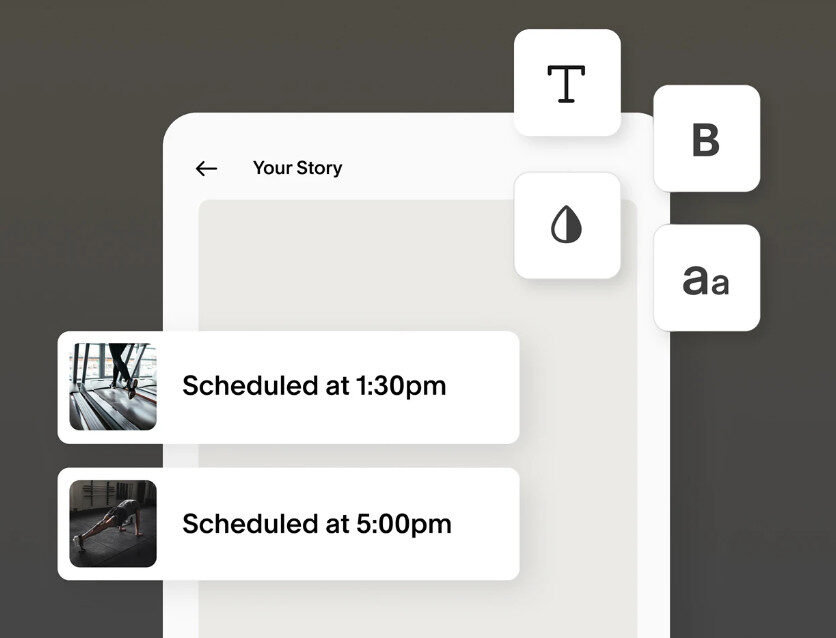
Squarespace for Pros is aimed at courting freelancers, agencies, and developers who need more design flexibility, deeper client management tools, and smarter workflows.
Unlike third-party plugins or patchwork integrations, everything is natively integrated, which means fewer headaches and a smoother, more intuitive experience.
Here’s what you get features-wise with Squarespace For Pros
Finish Layer: Next-Level Design Control
This is where Squarespace takes off the training wheels and gives creators full control.
🔄 Animate Page Elements
You can now add block-level animations—like fades, slides, and zooms—directly inside the editor.
It’s easy to use and doesn’t require any JavaScript. Want to showcase a product on scroll? Done.
Reveal testimonials with a staggered fade-in? No problem.
Example: A creative agency building a portfolio can now animate their case study sections to appear dynamically as users scroll, adding visual storytelling without code.
📱 Responsive Design at Every Breakpoint
Squarespace now lets you customize content specifically for desktop, tablet, and mobile views.
You can adjust padding, spacing, layout, and visibility across breakpoints to deliver a truly responsive site.
Example: A boutique soap brand can tweak its layout so product images are side-by-side on desktop but stacked cleanly with CTA buttons on mobile, without duplicating pages.
🎨 Deeper Styling & Layout Options
From block transforms (opacity, rotation, offset) to stacking elements and using layer panels, you can now build complex layouts that flow beautifully on any screen.
USP: These tools bring the kind of flexibility you’d expect from Webflow or Figma—but inside Squarespace’s no-code environment.
✍️ Upload Custom Fonts
Forget relying on the same default font sets. Now you can upload and use your own brand fonts to nail brand consistency across all pages.
Example: A designer creating a site for a law firm can now use a bespoke serif font the firm uses in its offline materials, ensuring full brand alignment.
You don’t have to pay $1,000+ for a new phone. Buying refurbished saves you, on average, 40% to 50%.
Which means you skip the inflationary price hikes, side-step the 2026 memory cost crisis, and still get the flagship performance and specs you want.
Recommended Options For 2026Workflow Enhancements: Build Faster, Work Smarter
Squarespace for Pros isn’t just about design—it’s about workflow efficiency.
🧱 Layer Panels, Groups, and Stacks
Group multiple blocks, style them all at once, and manage entire sections more efficiently.
Example: A designer building product landing pages for a SaaS startup can group pricing plans into one stack and apply hover effects or spacing updates across the board with one click.🔁 Saved Sections
You can now save and reuse full sections or pages across multiple projects.
This is huge for agencies handling similar layouts for different clients.
Example: A web studio working with restaurants can create a templated “Menu” section once, then duplicate and customize it across ten different client sites.
Business Tools: Scale Your Practice
Managing client projects and revenue streams is now built into the backend.
📊 Expanded Dashboard
Track your Circle partner status, referral commissions, and even see client project insights all from a single place.
🔌 Extensibility With API Access
Developers can now generate API keys, access updated documentation, and hook into external services—think CRMs, custom booking engines, analytics, and more.
Example: A wedding photographer’s website could integrate with a third-party photo proofing service or a custom calendar booking system, all via Squarespace’s new API capabilities.
You’re paying too much for data. Way too much.
Visible+ gives you unlimited premium data on Verizon’s 5G Ultra Wideband network, plus hotspot data and travel perks.
Compare top-ranked plansVisible+ includes
- Unlimited premium dataVerizon 5G Ultra Wideband
- Unlimited hotspot dataSpeeds up to 15 Mbps
- Travel extrasCanada and Mexico coverage, plus 2 days of Global Pass each month
Is Squarespace For Pros Worth it?
| Feature | Why It Matters |
|---|---|
| Finish Layer Animations | Add motion and interactivity without code |
| Responsive Breakpoint Control | Tailor design to every screen size precisely |
| Reusable Saved Sections | Build faster with templated sections |
| Full Font Upload Support | Achieve complete brand consistency |
| API & Extensibility | Connect with external tools and custom workflows |
| All-In-One Backend | Design, manage, and scale from one platform |
WordPress can do literally everything. WebFlow is great for quick, dynamic builds. Squarespace has always been the go-to for quick, code-free builds.
This is why creators and side-hustlers love it; there’s little to no complexity and no need for mountains of plugins and custom code.
But with this release, they’re making a real pitch to professionals who’ve outgrown the basics.
This is a significant move and I think it’ll earn Squarespace plenty of new users, especially for quick-to-build projects that require a little more nuance than its more basic version is capable of.
