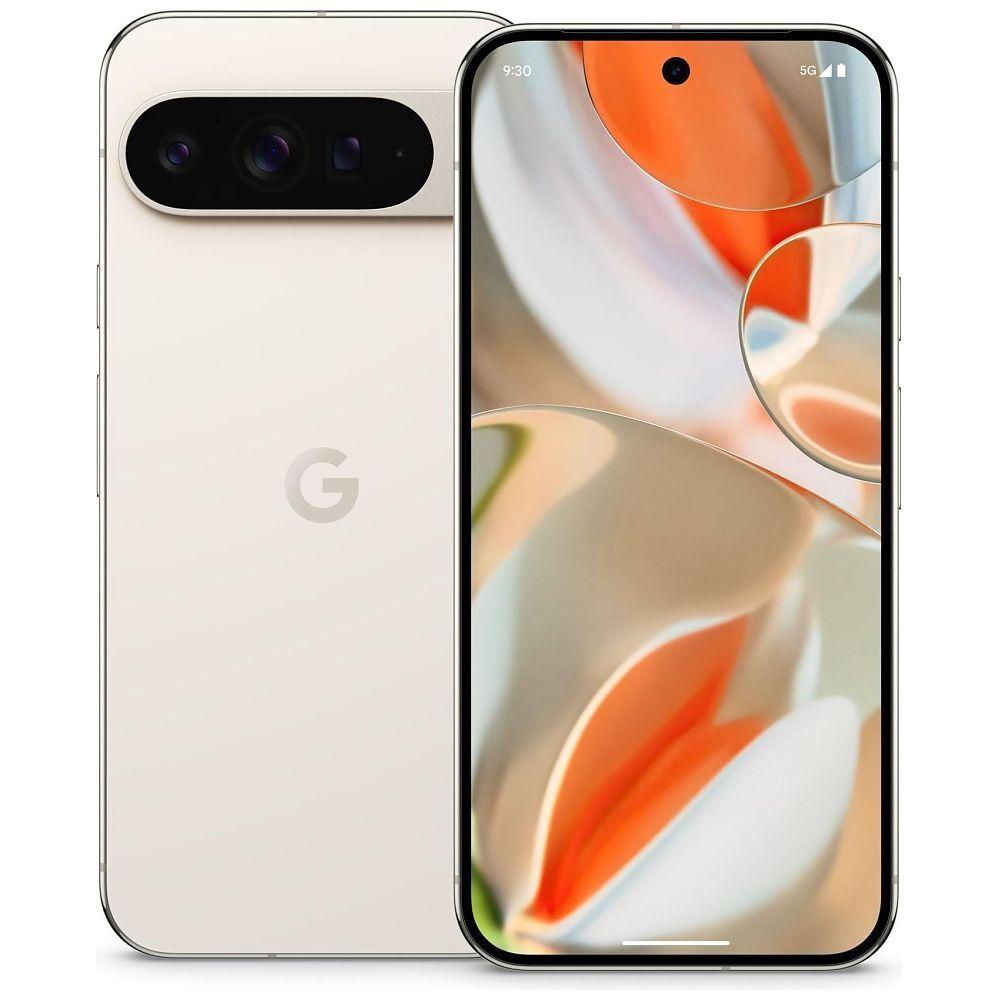
Pixel 11 Cameras: Which Model Is Best?
The Pixel 11 Pro and Pro XL have Google’s best camera system, but the standard Pixel 11 is the better-value choice for most people. The Pro XL does not take better pictures than the smaller Pro.
| Model | Camera System | Maximum Zoom | Best For |
|---|---|---|---|
| Pixel 11 | 48MP main camera, smaller ultrawide, telephoto and selfie sensors |
5x optical 30x Super Zoom |
Everyday photography and getting the best value |
| Pixel 11 Pro | 50MP main, 48MP ultrawide and 48MP 5x telephoto Same as Pro XL |
5x optical 120x Pro Zoom |
The best cameras without buying the larger XL |
| Pixel 11 Pro XL | 50MP main, 48MP ultrawide and 48MP 5x telephoto Same as Pro |
5x optical 120x Pro Zoom |
Pro cameras with a bigger screen and battery |
| Pixel 11 Pro Fold | Three rear cameras, but hardware closer to the standard Pixel 11 | 5x optical | Buyers who want the foldable design more than the best camera hardware |
All four Pixel 11 models include a main camera, an ultrawide camera and a telephoto camera with 5x optical zoom.
You do not need to buy a Pro model to get Google’s new Camera Looks and Magic Capture features.
The Pixel 11 Pro and Pro XL reach 120x Pro Zoom, but only the first 5x comes from true optical zoom. Everything beyond that uses digital processing.
The Pro and Pro XL add Instant Night Sight, 8K Video Boost, Pro Stable Video and a 42MP front camera.
The two Pro phones use the same camera system. Choose the XL for its bigger display and battery, not because you expect better pictures.
Google has put cameras back at the centre of the Pixel 11 series. Out of all the things mentioned at launch, the camera tech was the one Google spent the most amount of time on.
All four phones now have three rear cameras, including a proper 5x optical telephoto. That means you no longer need to buy a Pro Pixel simply to get optical zoom.
And that’s a nice, new addition that goes some way to softening the $100 price increase across all models.
But the four camera systems are definitely not equal.
- The Pixel 11 Pro and Pixel 11 Pro XL have much larger sensors, a far better ultrawide camera, a 42MP selfie camera, 8K Video Boost, Instant Night Sight and Google’s new 120x Pro Zoom system.
- The Pixel 11 Pro Fold costs more than any of them but uses camera hardware closer to the standard Pixel 11. You’re paying for the folding screen, not Google’s best cameras.
Here’s how every Pixel 11 camera compares, what the new AI tools actually do and which model is worth buying.
Pixel 11 camera specifications compared
| Camera | Pixel 11 | Pixel 11 Pro | Pixel 11 Pro XL | Pixel 11 Pro Fold |
|---|---|---|---|---|
| Main camera | 48MP | 50MP | 50MP | 48MP |
| Main sensor size | 1/1.56-inch | Approximately 1/1.3-inch | Approximately 1/1.3-inch | Smaller than Pro |
| Ultrawide | 13MP | 48MP with autofocus | 48MP with autofocus | 13MP class |
| Macro Focus | Yes | Yes | Yes | Yes |
| Telephoto | 10.8MP | 48MP | 48MP | 10.8MP |
| Optical zoom | 5x | 5x | 5x | 5x |
| Maximum photo zoom | 30x Super Zoom | 120x Pro Zoom | 120x Pro Zoom | Up to 30x |
| Front camera | 10.5MP autofocus | 42MP autofocus | 42MP autofocus | Outer and inner cameras |
| Maximum standard video | 4K at 60fps | 4K at 60fps | 4K at 60fps | 4K |
| 8K Video Boost | No | Yes | Yes | Model-dependent restrictions |
| Instant Night Sight | No | Yes | Yes | Available on selected cameras |
| Pro Stable Video | No | Yes | Yes | More limited |
| Pro controls | Limited | Yes | Yes | Limited |
Google’s specifications and feature availability can vary by country, camera and recording mode. Some AI and cloud-processed features also require an internet connection, Google Photos or a Google account to work, so keep that in mind if you buy one.
Which Pixel 11 has the best camera?
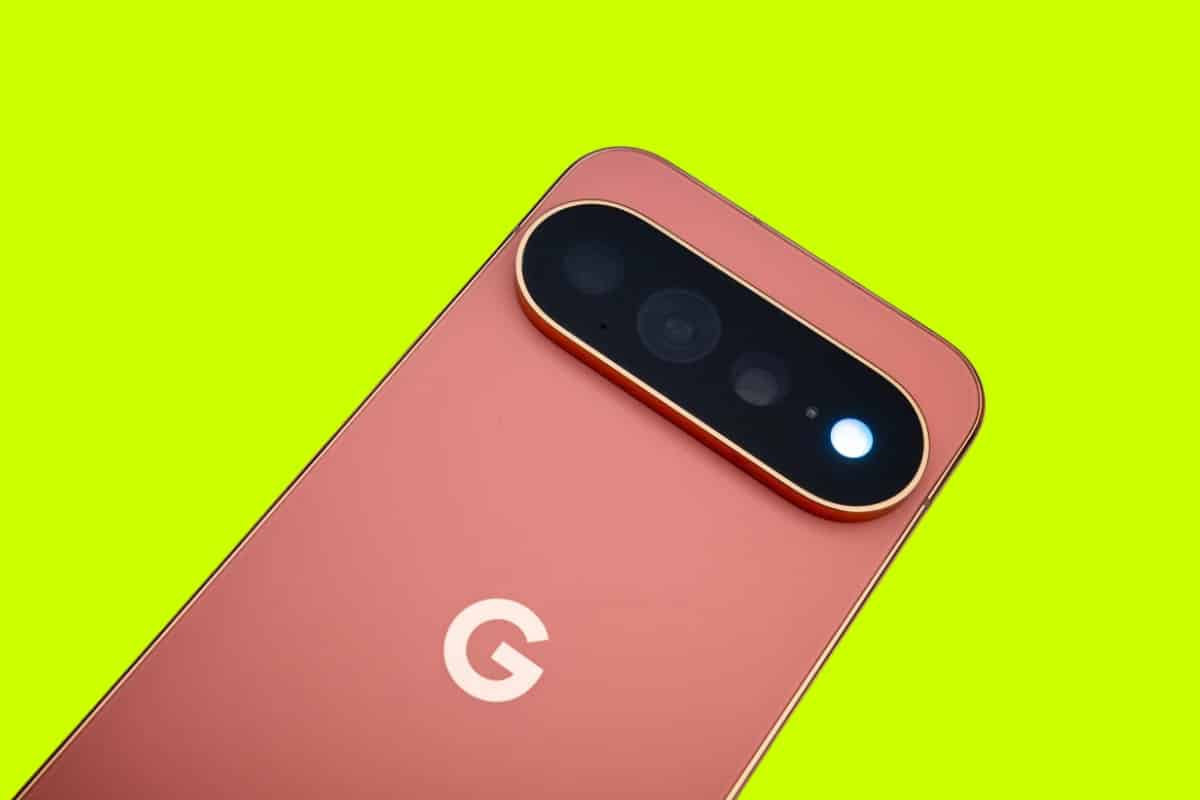
The Pixel 11 Pro and Pixel 11 Pro XL have the best camera system.
There is no camera-quality difference between them. Both use:
- 50MP main camera
- 48MP ultrawide camera with autofocus
- 48MP 5x telephoto camera
- 42MP autofocus selfie camera
- 120x Pro Zoom
- Instant Night Sight
- High-resolution portrait mode
- 8K recording through Video Boost
- Pro Stable Video
- Pro camera controls
- Night Sight Video
- Macro Focus Video
Buy the smaller Pixel 11 Pro if you want the best camera in a more manageable 6.3-inch phone.
Buy the Pixel 11 Pro XL if you want exactly the same camera with a larger viewfinder, bigger battery and faster charging.
The XL’s larger screen can make framing, reviewing and editing photographs more comfortable. It does not improve the picture captured by the sensor.
[snippet]
Which Pixel 11 camera is best for whom?
| You want… | Best model | Why |
|---|---|---|
| Best camera overall | Pixel 11 Pro | Full Pro camera system without the XL size |
| Best camera and battery | Pixel 11 Pro XL | Same Pro cameras with the largest battery |
| Best value | Pixel 11 | Main camera and 5x optical zoom for less |
| Best selfies | Pixel 11 Pro or Pro XL | 42MP autofocus front camera |
| Best zoom | Pixel 11 Pro or Pro XL | 48MP telephoto and 120x Pro Zoom |
| Best low-light camera | Pixel 11 Pro or Pro XL | Larger sensors and Instant Night Sight |
| Best video | Pixel 11 Pro or Pro XL | 8K Video Boost and Pro Stable Video |
| Best folding camera phone | Pixel 11 Pro Fold | Flexible shooting positions and dual screens |
| Best camera for most people | Pixel 11 | Strong main camera, optical zoom and shared AI tools |
Pixel 11 camera: the best value
The standard Pixel 11 has received a proper camera upgrade.
Its rear system consists of:
- 48MP main camera
- 13MP ultrawide camera
- 10.8MP 5x telephoto camera
- 30x Super Zoom
- Optical image stabilisation on the main and telephoto cameras
- 10.5MP autofocus front camera
Google says the new 48MP main sensor provides up to 56% better light sensitivity. The sensor measures approximately 1/1.56 inches, giving it more surface area for collecting light than the camera it replaces.
Better light sensitivity can mean:
- Less noise in indoor photographs
- Shorter Night Sight capture times
- Sharper pictures of moving subjects
- Better detail in shadows
- Less reliance on aggressive software brightening
- More natural colours in poor lighting
The big addition is the 5x optical telephoto camera.
The standard Pixel can now photograph distant subjects at a true optical 5x focal length before Google starts relying heavily on cropping and computational processing.
That’s useful for:
- Concerts
- Sporting events
- Wildlife
- Buildings and architecture
- Portraits taken from farther away
- Children or pets without getting in their faces
Its zoom reaches 30x, although quality naturally drops as you move beyond the optical 5x point.
The Pixel 11 does not have the same telephoto sensor as the Pro. Its 10.8MP sensor is considerably smaller than the 48MP unit inside the Pro and Pro XL.
That affects detail, low-light zoom and the amount of information available when cropping.
At 5x in good daylight, the standard Pixel 11 should perform very well. At night, indoors or above 10x, the Pro models should pull away.
What the standard Pixel 11 misses
Compared with the Pro and Pro XL, the standard model misses:
- 50MP Pro main camera
- 48MP ultrawide camera
- 48MP telephoto camera
- 42MP selfie camera
- 120x Pro Zoom
- Instant Night Sight
- High-resolution 50MP portraits
- Full Pro controls
- 8K Video Boost
- Pro Stable Video
That’s quite a list, but it doesn’t make the standard camera bad.
Most people take the majority of their pictures with the main 1x camera. The Pixel 11 has a very capable new main sensor, Google’s familiar image processing and the same general set of automatic photography tools.
It is the sensible camera choice for people who want good pictures without paying Pro prices.
Pixel 11 Pro camera: the best overall
The Pixel 11 Pro has the best balance of camera hardware, price and physical size.
Its rear camera system includes:
- 50MP main camera
- Approximately 1/1.3-inch main sensor
- 48MP ultrawide camera with autofocus
- 48MP 5x telephoto camera
- Optical stabilisation on the main and telephoto cameras
- Multi-zone laser autofocus
- Spectral and flicker sensor
- 120x Pro Zoom
- 42MP autofocus selfie camera
The larger main sensor is the first reason to buy it.
Sensor size matters because a larger sensor can collect more light. More light gives the camera more information to work with before Tensor G6 starts processing the image.
In practical terms, the Pro should produce better results when photographing:
- Children or pets that won’t stay still
- People inside dim restaurants
- Night-time street scenes
- Indoor events
- Backlit faces
- Moving subjects in poor light
- High-contrast scenes with bright skies and dark foregrounds
The 48MP ultrawide camera is another important difference.
The standard Pixel 11 uses a 13MP ultrawide. The Pro’s 48MP unit records more detail and uses autofocus, which also allows it to work as a macro camera.
If you regularly photograph food, flowers, insects, watches, keyboards, jewellery or small product details, the Pro is the better phone.
Pixel 11 Pro XL camera: no better than the smaller Pro
The Pixel 11 Pro XL uses exactly the same main, ultrawide, telephoto and front cameras as the Pixel 11 Pro.
You do not get:
- A larger camera sensor
- More megapixels
- Longer optical zoom
- Better stabilisation
- A unique video mode
- A separate camera processor
What you do get is a 6.8-inch display and a larger battery.
The bigger display makes the XL a nicer phone for:
- Reviewing photographs
- Editing in Google Photos
- Trimming video
- Using the Creator Suite
- Reading a teleprompter
- Framing shots from a distance
- Showing pictures to other people
Its larger battery should also cope better with long recording sessions, navigation, uploads and screen-on editing.
But if your only concern is image quality, buy the Pixel 11 Pro and save the money.
Pixel 11 Pro Fold camera: expensive, but not the best
The Pixel 11 Pro Fold is the awkward one.
It is the most expensive phone in the family, but it does not receive the Pro and Pro XL camera hardware.
Its triple-camera system is closer to the standard Pixel 11, using a 48MP main camera and smaller accompanying sensors.
That means it lacks the Pro pair’s:
- Large 50MP main sensor
- 48MP ultrawide camera
- 48MP telephoto camera
- 42MP front camera
- Full 120x Pro Zoom system
The Fold does have one very useful photography trick: its design.
You can partially open the phone and place it on a table, wall or other flat surface. One half acts as a built-in stand while the other contains the cameras.
That is handy for:
- Group photographs
- Family pictures that include the photographer
- Long exposures
- Night photography
- Time-lapse footage
- Video calls
- Product demonstrations
- Self-recorded video
- Hands-free Creator Suite recording
The outer display can also act as a preview screen, allowing the subject to see the framing while someone photographs them with the rear cameras.
Those physical advantages are real. But they don’t change the underlying point: the Fold is for people who want a folding phone that also takes good Pixel photographs.
It is not the model to buy if your first priority is camera quality.
5x optical zoom is now standard across the range
Every Pixel 11 model has a dedicated 5x telephoto camera.
That’s a major change because it gives standard-model buyers access to focal lengths previously tied to Google’s more expensive phones.
Optical zoom uses a dedicated lens to capture the subject. Digital zoom enlarges and crops the image recorded by the sensor.
Google then combines optical hardware, sensor crops, image stacking and Tensor G6 processing to cover the distances between each camera.
The useful zoom stages are approximately:
- 0.6x: ultrawide
- 1x: main camera
- 2x: crop from the main sensor
- 5x: optical telephoto
- 10x: sensor crop and computational processing
- 30x: maximum standard Pixel 11 zoom
- 120x: maximum Pro Zoom on the Pro and Pro XL
The numbers above 5x are not optical zoom.
That doesn’t make them useless, but it does mean they shouldn’t be compared directly with a physical 30x or 120x lens on a dedicated camera.
What is 120x Pro Zoom?
Pixel 11 Pro and Pixel 11 Pro XL can reach 120x using Google’s Pro Zoom system.
This combines:
- 5x optical telephoto hardware
- A 48MP telephoto sensor
- Optical stabilisation
- Multiple captured frames
- Subject recognition
- Tensor G6 image processing
- Machine-learning reconstruction
- AI-generated image information
The last point needs to be understood.
At 120x, the camera is not simply recording every detail through the lens. Google’s software analyses the available frames and reconstructs missing information to create a usable final picture.
That makes 120x helpful for identifying or recording things such as:
- A sign across a street
- A landmark in the distance
- A performer on a stage
- A bird sitting high in a tree
- A scoreboard
- The moon
- An architectural feature
I wouldn’t rely on it for documentary evidence, reading very small legal text or any situation where reconstructed detail could be mistaken for literal sensor data.
It is a clever computational camera mode. It isn’t a telescope.
Pixel 11 30x versus Pixel 11 Pro 120x zoom
The maximum number doesn’t tell the full story.
| Zoom range | Pixel 11 | Pixel 11 Pro and Pro XL |
|---|---|---|
| 1x | Strong | Best |
| 2x | Good sensor crop | Better sensor crop |
| 5x | True optical zoom | True optical zoom |
| 10x | Computational | Better 48MP telephoto base |
| 20x | Usable in good light | Stronger detail and stability |
| 30x | Maximum | Still within Pro range |
| 31x to 120x | Not available | Heavy AI reconstruction |
The Pro’s advantage begins before 120x because it starts with a much larger 48MP telephoto sensor.
Even at 5x and 10x, the Pro should retain more detail, perform better in poor light and give Tensor G6 more original image data to work with.
What is Magic Capture?
Magic Capture is one of the most useful new Pixel 11 camera tools.
Instead of forcing you to choose between recording a video and taking pictures, Magic Capture records up to two minutes of video while automatically identifying photograph-worthy moments.
The phone then produces high-quality 12MP still images from the recording.
Tensor G6 looks for:
- Clear faces
- Open eyes
- Smiles
- Peak action
- Reduced motion blur
- Good composition
- Important movement
- Moments where the subject faces the camera
Imagine filming your child scoring a goal. You get the complete video, but Magic Capture can also pull out a clear photograph of the kick or celebration.
Other examples include:
- A pet jumping into water
- Someone blowing out birthday candles
- A wedding confetti throw
- A skateboard trick
- A child opening a present
- A performer moving across a stage
- A group of friends reacting to something
This isn’t simply grabbing a random screenshot from a video. Google uses computational processing to select, clean up, crop and sharpen the frames it thinks are worth keeping.
Magic Capture is available across the Pixel 11 series, making it one of the standard model’s strongest new features.
What are Camera Looks?
Camera Looks lets you change how a Pixel photograph is rendered before you press the shutter button.
The main styles include:
- Original
- Natural
- Shadows
- Vanilla
- Digi
- Black Tie
- Minimal
- Editorial
- Classic
- Velvet
You can also adjust elements including:
- Brightness
- Contrast
- Highlights
- Colour treatment
Natural produces a softer, less aggressively processed appearance.
Vanilla adds a warmer, more golden tone.
Shadows increases contrast and produces darker, moodier images.
Digi is designed to resemble early consumer digital-camera photography.
The important distinction is that Camera Looks aren’t ordinary social-media filters added after the photograph has been processed. Google says the styles work at the sensor-processing stage and appear in the viewfinder before capture.
You therefore compose the picture around the finished appearance rather than trying to rescue or restyle it afterwards.
Camera Looks are currently exclusive to the Pixel 11 family. Google has not committed to bringing them to older Pixel phones. The Verge
What is Instant Night Sight?
Night Sight normally captures several exposures and combines them to brighten dark scenes, reduce noise and recover detail.
That process works, but it can take time. And during that time, the subject can move.
Instant Night Sight uses Tensor G6 and the Pro models’ larger camera sensors to shorten the capture process.
Google says it can operate up to 4.5 times faster than the previous approach.
That should help when photographing:
- People inside dark bars
- Children at evening events
- Pets moving around indoors
- Street scenes at night
- Concerts
- Christmas lights
- Indoor parties
- Subjects that won’t remain perfectly still
A faster Night Sight exposure should mean less motion blur and fewer missed pictures.
The largest gains are reserved for the Pro camera system because its sensors start by collecting more light. Software can clean up a dark photograph, but it cannot completely replace the advantage of gathering more real light in the first place.
What is Pro Stable Video?
Pro Stable Video is Google’s strongest video-stabilisation mode on the Pixel 11 Pro and Pro XL.
It combines:
- Optical image stabilisation
- Electronic stabilisation
- Gyroscope movement data
- Tensor G6 processing
- Frame alignment
- Motion analysis
It is designed to smooth movement caused by walking, handheld panning and general camera shake.
Good uses include:
- Walking through a city
- Recording children or pets
- Filming while following a subject
- Handheld travel video
- Vlogging
- Panning across a scene
- Recording from a moving vehicle
Can it replace a gimbal? For casual video, probably much of the time.
A proper motorised gimbal still has advantages for controlled camera movements, running shots, cinematic pans and longer professional work. Pro Stable Video is easier because it requires no separate hardware, balancing or charging.
Does Pixel 11 record real 8K video?
The Pixel 11 Pro and Pixel 11 Pro XL support 8K recording through Video Boost.
That wording matters.
The phone does not produce the final 8K result entirely on-device in the same way a dedicated 8K camera records directly to storage.
The workflow involves:
- Recording the original video on the Pixel.
- Uploading it for Video Boost processing.
- Google’s servers applying stabilisation, colour, noise reduction and resolution processing.
- The finished version returning through Google Photos.
That means 8K Video Boost can require:
- Internet access
- Google Photos
- Upload time
- Processing time
- Cloud storage
- Additional battery and data use
It can produce better-looking footage, especially in difficult light, but it is not instant.
If you need to record, edit and send footage immediately, use 4K.
What is Creator Suite?
Creator Suite is Google’s attempt to make the Pixel 11 more useful for people producing video for YouTube, TikTok, Instagram and other platforms.
Its tools include:
- Built-in teleprompter
- Project folders
- Social-media framing guides
- Audio visualisations
- Recording organisation
- Creator-focused capture controls
- Faster movement between filming and editing
The teleprompter is probably the most immediately useful addition.
You can place a script on-screen while recording yourself with the front camera. That saves you from trying to remember every line or positioning a second phone next to the lens.
Social framing guides help you keep subjects, text and products inside areas that won’t be covered or cropped by platform controls.
Project folders keep the clips, photographs and audio for each piece of content together rather than dumping everything into the main camera roll.
The Creator Suite is not going to replace Premiere Pro, Final Cut or DaVinci Resolve. It isn’t trying to. It’s designed to reduce the faffing between deciding to make something and getting usable footage recorded.
Camera Coach
Camera Coach uses Gemini models to suggest how you might improve a photograph.
It can recommend:
- A different angle
- Moving closer or farther away
- Changing the framing
- Trying another lens
- Adjusting the lighting
- Repositioning the subject
- Using a different camera mode
It’s aimed at people who want better photographs but don’t know why a particular composition isn’t working.
It does not physically move you or control every part of the shot. Think of it as a set of contextual suggestions rather than an automatic professional photographer.
Edit with Ask Photos
Edit with Ask Photos lets you describe the change you want instead of finding the correct editing control.
Examples include:
- “Remove the people in the background.”
- “Make the sky less grey.”
- “Brighten my face.”
- “Move the subject into the centre.”
- “Remove the glare from the window.”
- “Make this look like it was taken at sunset.”
- “Crop this for Instagram.”
Google Photos interprets the request and attempts the edit using its generative tools.
Some changes are corrective. Others generate new image information, so the result may no longer represent the exact scene captured by the camera.
Auto Best Take
Best Take examines several similar group photographs and lets you choose the preferred expression for each person.
Auto Best Take goes a step further by identifying and assembling the most usable version automatically.
It helps when:
- Someone blinked
- A child looked away
- One person stopped smiling
- A face was briefly covered
- Different people looked good in different frames
The final image can combine expressions recorded across multiple photographs.
It’s useful for family and group pictures, although it creates a composite moment rather than preserving one single instant exactly as it happened.
Zoom Enhance
Zoom Enhance uses AI to improve a cropped or zoomed photograph after it has been taken.
It analyses the existing image and attempts to recover or reconstruct detail that became soft during enlargement.
It can help with:
- Reframing a distant subject
- Improving a crop
- Making an animal or person more visible
- Tightening the composition after capture
- Cleaning up older Pixel photographs
It cannot reproduce information the sensor never recorded with perfect accuracy. The farther you push the crop, the more reconstruction is required.
Real Tone
Real Tone remains part of Google’s camera system across the Pixel 11 family.
It is designed to represent a wider range of skin tones accurately by improving:
- White balance
- Exposure
- Colour calibration
- Face detection
- Low-light processing
- Group-photo consistency
This also carries through Camera Looks. Styling a photograph should not result in inaccurate or inconsistent treatment of different skin tones.
Macro Focus
Macro Focus uses an autofocus-capable ultrawide camera to photograph subjects at very close distances.
The Pro and Pro XL have the best hardware for this because they use a 48MP autofocus ultrawide sensor.
Macro Focus is useful for:
- Flowers
- Insects
- Jewellery
- Food
- Watches
- Circuit boards
- Product details
- Textures
- Small objects
The standard Pixel 11 supports close photography, but its 13MP ultrawide sensor will not retain the same level of detail as the Pro’s 48MP unit.
Front cameras compared
| Model | Front camera | Best use |
|---|---|---|
| Pixel 11 | 10.5MP with autofocus | Video calls and everyday selfies |
| Pixel 11 Pro | 42MP ultrawide with autofocus | Group selfies and creator video |
| Pixel 11 Pro XL | 42MP ultrawide with autofocus | Same as Pro |
| Pixel 11 Pro Fold | Outer and inner cameras | Flexible video calls and framing |
The 42MP Pro selfie camera has a wider field of view and more resolution for cropping.
It is better suited to:
- Group selfies
- Travel photographs
- Vlogging
- 4K front-camera video
- Vertical social video
- Low-light selfies
- Recording with Creator Suite
The Fold gives you another option: you can use the rear cameras for selfies while previewing the framing on the external display. That produces better results than either of its dedicated front cameras.
Pixel 11 camera features by model
Pixel 11 Camera Features By Model
Google’s core photography tools are available across the range. The Pro and Pro XL add the more advanced zoom, low-light and video features.
| Camera Feature | Pixel 11 | Pixel 11 Pro | Pro XL | Pro Fold |
|---|---|---|---|---|
| Magic Capture | Yes | Yes | Yes | Yes |
| Camera Looks | Yes | Yes | Yes | Yes |
| 5x optical zoom | Yes | Yes | Yes | Yes |
| 30x zoom | Yes | Yes | Yes | Yes |
| 120x Pro Zoom | No | Yes | Yes | No |
| Instant Night Sight | No | Yes | Yes | Limited |
| Pro Stable Video | No | Yes | Yes | Limited |
| 8K Video Boost | No | Yes | Yes | Limited |
| 42MP selfie camera | No | Yes | Yes | No |
| 48MP ultrawide | No | Yes | Yes | No |
| 48MP telephoto | No | Yes | Yes | No |
| Pro controls | No | Yes | Yes | No |
| Creator Suite | Yes | Yes | Yes | Yes |
| Camera Coach | Yes | Yes | Yes | Yes |
| Edit with Ask Photos | Yes | Yes | Yes | Yes |
| Auto Best Take | Yes | Yes | Yes | Yes |
| Zoom Enhance | Yes | Yes | Yes | Yes |
| Real Tone | Yes | Yes | Yes | Yes |
| Macro Focus | Yes | Yes | Yes | Yes |
| Video Boost | No | Yes | Yes | Selected modes |
Feature availability can vary by country, account, camera and software version.
Which camera differences actually matter?
Google lists an awful lot of camera features. These are the differences most likely to affect your pictures.
Buy the Pro for:
- Better pictures in poor light
- Better 5x and 10x zoom
- Usable zoom beyond 30x
- Higher-resolution ultrawide photographs
- Better macro images
- Sharper selfies
- 8K Video Boost
- Full video stabilisation
- Pro controls
- Faster Night Sight
Stick with the standard Pixel 11 if:
- Most of your pictures use the 1x main camera
- You rarely zoom beyond 5x
- You mostly photograph in daylight
- You don’t record much serious video
- You don’t need 42MP selfies
- You want Magic Capture and Camera Looks without Pro pricing
Buy the Fold if:
- You specifically want a folding phone
- You want hands-free shooting positions
- You like previewing rear-camera selfies
- The internal display matters more than having Google’s best sensors
Are the Pixel 11 Pro cameras worth the extra money?
For somebody who cares about photography, yes. Apple’s iPhone is still the gold-standard for video, however, so if you want to shoot video (either for YouTube or social media), you’re going to be better off with one of its Pro Max models.
The standard Pixel 11 gets many of the same software features, but the Pro begins with better image data:
- Larger main sensor
- Four times the ultrawide resolution
- More than four times the telephoto resolution
- Four times the front-camera resolution
- Better low-light capture
- More room for cropping
- Stronger stabilisation and video modes
AI processing works best when it has a clean, detailed image to start with. Tensor G6 can reduce noise and reconstruct missing detail, but it cannot make a small 10.8MP telephoto sensor behave exactly like a larger 48MP one.
The standard camera will be good enough for most people.
The Pro camera is for people who notice the difference.
Should Pixel 10 owners upgrade for the camera?
It depends on the model.
Pixel 10 to Pixel 11
The new main sensor, Magic Capture, Camera Looks and other processing changes give you a reason to consider upgrading, but it is not an automatic decision.
Pixel 10 Pro to Pixel 11 Pro
The hardware and 120x zoom are newer, but the Pixel 10 Pro already has an excellent 50MP, 48MP and 48MP camera system. Camera Looks, Magic Capture and faster low-light capture are the more interesting changes.
Pixel 9 Pro to Pixel 11 Pro
This is a larger two-generation jump, especially for processing speed, zoom reconstruction, low-light capture and new software tools. Even then, the Pixel 9 Pro remains a strong camera phone.
Anyone upgrading purely for Camera Looks or Magic Capture should wait to see whether Google brings any version of those tools to older Pixels through a future Pixel Drop. Camera Looks is currently Pixel 11-only, but Google hasn’t said it will remain exclusive forever.
Which Pixel 11 should you buy for the camera?
Buy the Pixel 11 if you want value
It now has a proper triple-camera system, including 5x optical zoom. Magic Capture and Camera Looks are included, and the new 48MP main sensor should perform well in most conditions.
Buy the Pixel 11 Pro if you want the best camera
This is my pick.
You get the full Pro camera system in a smaller body. It takes the same photographs as the Pro XL and costs less.
Buy the Pixel 11 Pro XL if you want camera plus battery
It has the same cameras as the Pro but gives you more screen space for editing and a larger battery for long recording sessions.
Buy the Pixel 11 Pro Fold for its design, not its camera
The Fold can take very good photographs and its folding body creates useful shooting positions. But it costs much more while using weaker camera hardware than the ordinary Pro models.
Final verdict
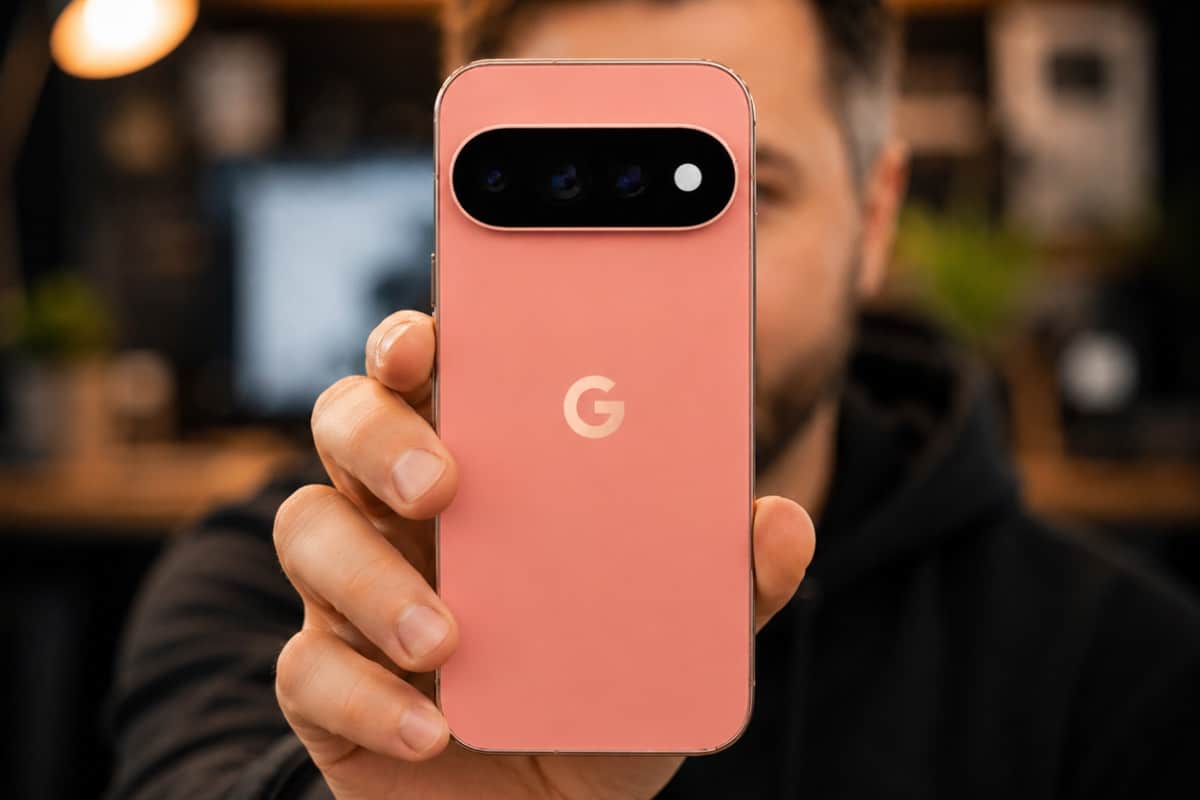
The Pixel 11 Pro is the best camera phone in the Pixel 11 series.
It has exactly the same camera hardware as the larger Pro XL, including the 50MP main sensor, 48MP ultrawide, 48MP telephoto, 42MP front camera, 120x zoom and Pro video tools.
- The standard Pixel 11 is the best value. Google has finally given the regular model a proper 5x optical telephoto camera, and it still receives the headline Magic Capture and Camera Looks features.
- The Pixel 11 Pro XL is best for heavy video users because its larger display and battery make recording, reviewing and editing easier.
- The Pixel 11 Pro Fold is the least impressive in the camera department given its higher price point; its sensors are closer to those inside the standard Pixel 11.
If you simply want the answer:
- buy the Pixel 11 Pro for the best camera
- buy the standard Pixel 11 if you want most of the experience for less
See the latest Pixel 11 deals, trade-in offers and carrier promotions
Sources & Side Quests
- Google Pixel 11 specifications
- Google Pixel hardware specifications
- Wired: Pixel 11 camera features explained
- The Verge: Camera Looks and Pixel 11 exclusivity
- Digital Camera World: Pixel 11 sensors, zoom and light sensitivity
- The Verge: Made by Google launch coverage
- Wired: Everything announced at Made by Google 2026
- Android Central: Pixel 11 Pro Fold hands-on
Buying tools
Thinking About Buying a Google Pixel?
Compare current refurbished prices, see how it stacks up against alternatives, and avoid overpaying for the wrong model.
Recommended for this article