iPhone 17 Pro Max Review for Creators: A Massive Upgrade From the iPhone 14 Pro
I decided on the iPhone 17 Pro Max because I’ve basically run my iPhone 14 Pro Max into the ground.
The battery health was down to 75% and that basically means you’re on a twice-a-day top-up schedule if you push it too hard.
I could have gotten the battery swapped out, but I felt like treating myself. I’ve had this phone for 3 years now and it has been great.
Most people don’t update their phone every 12 months, that’d be insane. Of course, some people do. But not me; I run my phones into the ground to make sure I get my money’s worth out of them.
Another benefit of holding onto your phones for longer, however, is that you can actually appreciate and feel updates.
Three years is a long time in the world of phones, so when I unboxed my shiny, new iPhone 17 Pro Max I was not disappointed.
It actually looked different for starters (at least, it does from behind) and it was noticeably snappier.
Here’s my opinion on why anyone running an iPhone 14 or older who works as a creator should 100% be looking at the iPhone 17 Pro Max as an upgrade.
The Screen Feels Built for Editing

The first thing that hit me was the screen. It’s massive — 6.9 inches — and noticeably brighter.
The new OLED panel hits up to 3000 nits outdoors, which makes a practical difference when framing shots in sunlight. My 14 Pro struggled with glare; the 17 Pro Max doesn’t.
I can actually see my shot in full sunlight without guessing exposure or squinting under my hand. If you edit in LumaFusion, CapCut, or VN, the extra space and clarity makes a difference.
I can scrub timelines, check focus, and adjust overlays without everything feeling cramped.
Battery Life: Legit All-Day
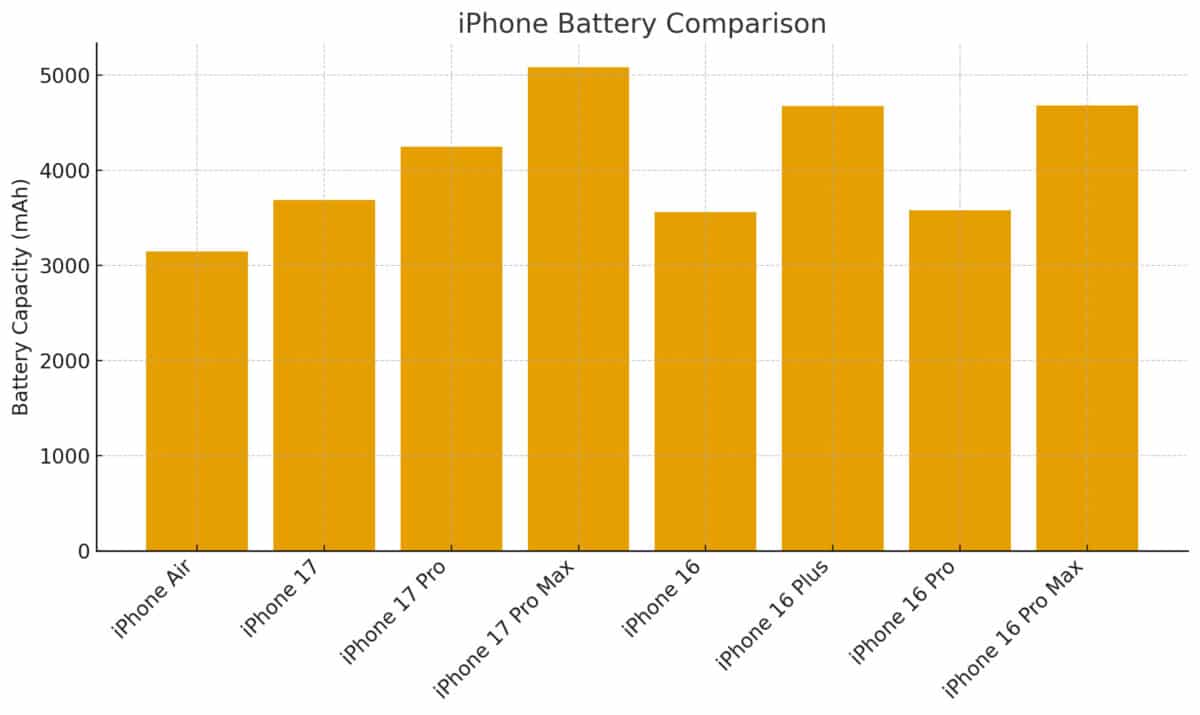
On the 14 Pro, I’d start stressing about the battery by mid-afternoon if I’d been filming or editing.
With the 17 Pro Max, I’ve gone full 10–12 hour days (multiple shoots, edits, calls, uploads) and still had 20–30% left.
I don’t carry a power bank anymore.
When I do need to charge, 20 minutes gets me halfway back with the 40W charger. I’ve stopped thinking about battery, and that’s a win.
Cameras: Best I’ve Used On a Phone

All three lenses are 48MP now, and the 4x optical zoom plus the new 8x sensor crop actually work.
I shoot product b-roll and behind-the-scenes content, and what used to be soft and noisy on the 14 Pro is now detailed and clean.
The 8x is sharp enough to use in published content, not just social stories.
Apple Log 2 is the real upgrade though.
I shoot in Log now, grade in Final Cut, and the files have way more flexibility than the flat ProRes I used to rely on.
It holds highlights, keeps skin tones intact, and makes mobile-shot footage look cinematic with minimal work.
When shooting product shots for YouTube or Instagram, 8x gives you crisp, low-noise close-ups without digital artefacts.
Video quality gets the biggest jump. Coming from the 14 Pro, here’s all the changes that really stood to me:
- Apple Log 2 delivers flatter, more flexible files. You can push shadows and highlights without breaking the footage.
- 4K Dolby Vision at 120fps is available on both front and rear cameras, which gives you smoother slow-motion with consistent colour science.
- Dual Capture lets you record front and rear at the same time, useful for reactions and interview-style clips.
- Improved Action Mode delivers more stable handheld footage with less micro-jitter than the 14 Pro.
- Spatial Video is niche today, but creators who shoot behind-the-scenes or immersive content will find it interesting.
Stabilisation + Dual Capture = Less Gear, More Useable Footage
I stopped using a gimbal. The stabilisation is that good. I’ve handheld walking shots at 2x zoom that came out smoother than anything I shot on the 14 Pro.
Dual Capture (recording front and rear at the same time) is great for live reactions or BTS clips because I don’t have to shoot A-roll and then spin the camera for a reaction.
There’s been apps that could do this for years but it’s nice to finely have this feature natively inside the iPhone camera app.
It saves time on editing and makes production, especially for social media posts, way faster.
Workflow and AI Tools
The 17 Pro Max has a new AI stabilisation feature which, in most settings, negates the need for a gimbal. I also really enjoyed the new framing guides and variable aspect ratio tools.
These new tools are designed to reduce the number of reshoots you need to do, especially when you’re filming alone. It works too; the stabilization alone has quickly become one of my favorite features of this phone.
The framing assistant is accurate enough to keep a subject centred while you adjust lighting or props.
Exporting to Final Cut or DaVinci Resolve is faster thanks to the 10 Gbps USB-C port.
Moving large ProRes files from the 14 Pro used to feel slow and painful; here it’s fast enough to make wired transfer the default again.
Front Camera: Finally Good Enough
The 18MP front camera is no joke. On the 14 Pro, I avoided using the selfie cam for anything serious.
Now I use it for vlogs, short-form content, and FaceTime calls that don’t look like they were filmed through a potato.
The square sensor means I can shoot in vertical or horizontal and still keep resolution. Centre Stage works well too; it keeps me framed even if I’m pacing during a talking head.
Battery Performance: Yep, It’s Top-Shelf Now
My 14 Pro would drop 25 to 30 percent after an hour of 4K recording.
The 17 Pro Max is far more stable.
With its larger battery and better power management, a full day of shooting clips, taking photos, editing short videos, and browsing socials still left me with 25 percent by bedtime.
If you shoot long sessions outdoors or at events, this matters more than any spec on a sheet.
Faster 40-watt wired charging means you can recover half a battery during a quick break.
Thermals & Performance: Problem Solved
The 14 Pro would get uncomfortably warm after 10–15 minutes of 4K HDR shooting.
The 17 Pro Max has a vapor chamber now and it works, cooling down the phone during CPU-intensive tasks.
I’ve pushed this phone hard, 4K 60fps Log capture for 20 minutes, background music apps, Bluetooth mics, and it stays cool enough to hold and doesn’t throttle.
Exports are quicker, preview playback is smoother, and even with multi-layer edits, it doesn’t choke.
File Handling: USB-C Fixes Everything
This is the first time I’ve actually used wired transfer with my iPhone. With USB-C 3.0, I can dump ProRes footage straight to my Mac at full speed.
AirDrop is still convenient, but when I’ve got 40GB of video to move, this is way faster.
No more dragging files over Lightning and waiting forever. This is also the first iPhone I’ve used with USB C as well.
It’s so much more convenient. No matter where you go on the planet, someone ALWAYS has a USB C charger. Whereas with Apple’s Lightning, you’re unlikely to find one at your local bar or even your most of your friends’ houses (in my case).
Downsides? Yeah, There’s A Few
It’s big. It’s heavy. After 20 minutes of shooting handheld video, you feel it in your wrist.
It’s also expensive and if you’re not actively using the Log profiles, the multi-cam options, the zoom range, and it’s more professional-grade, you probably won’t get your money’s worth.
The AI stuff is fine but forgettable. It’s not like what you get on modern Google Pixel phones. But in a way, I kind of prefer this kind of AI; the machine-learning type, where it’s hidden away in the guts of the phone doing your bidding.
Clean Up works on simple backgrounds, the AI stablization is great, and the framing assistant is handy, but this isn’t why you buy the phone. They’re just nice cherries on top of the cake.
Bottom Line: If You’re a Creator, This One’s Worth It
If your phone is your main camera, editor, upload machine, and production tool, this upgrade is worth it. Coming from the 14 Pro, it fixes everything that used to slow me down or make me second-guess mobile shooting.
If you just want a fast iPhone to scroll and snap some pics, save your money and get the base model iPhone 17 – it’s a brilliant phone and much, much cheaper.
But if you live in your camera app, edit on the go, shoot for hours, and need pro features without dragging around a bag of gear, the 17 Pro Max is the one to get.
Next step
Looking at refurbished iPhones?
Use these current KYM deal pages to compare live prices and avoid paying new-phone money.